
Download ZeyOS – Unified CRM, Groupware & ERP Workspace
Overview
ZeyOS is marketed as the “Microsoft Office of virtual workspaces,” a single‑pane solution that brings together Customer Relationship Management (CRM), groupware collaboration tools, and Enterprise Resource Planning (ERP) capabilities under one roof. The idea is simple yet powerful: eliminate the need for multiple, disconnected applications and let teams run their entire business from a single, centralized interface. For small‑to‑mid‑size companies that struggle with data silos, ZeyOS promises a smoother workflow, reduced licensing overhead, and a clearer view of key performance indicators.
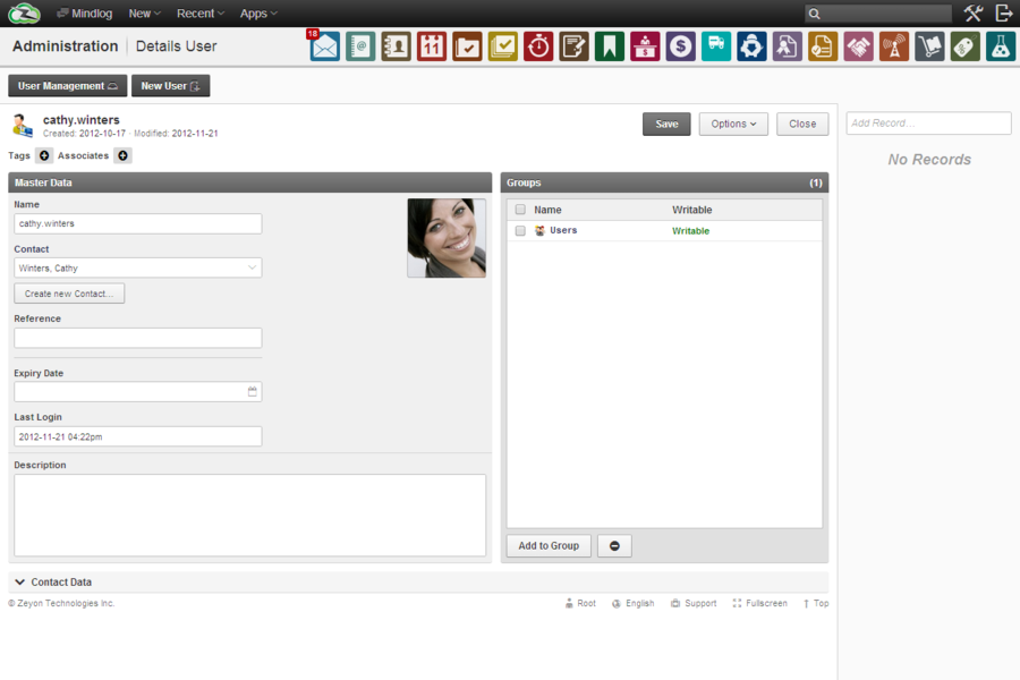
The platform’s user interface is intentionally compact, packing a lot of functionality into a relatively small screen real‑estate. While some users may initially find the layout “cramped,” the developers have leveraged a palette of distinct, colour‑coded icons to guide navigation. Each module—whether it’s the sales pipeline, the shared calendar, or the inventory dashboard—carries its own visual cue, making it easier to jump between tasks without getting lost.
Beyond the visual design, ZeyOS shines in its ability to synchronize data across its three core pillars. A new lead entered in the CRM automatically appears in the sales forecast, which in turn can trigger inventory reservations in the ERP module. This level of integration reduces manual data entry, cuts the risk of errors, and accelerates decision‑making. In short, ZeyOS aims to be the all‑in‑one work hub that lets you download, install, and start managing your business in minutes, while staying secure and up‑to‑date.
Key Features & Functionality
- Unified CRM Suite – Capture leads, manage contacts, track opportunities, and generate sales reports without leaving the platform.
- Groupware Collaboration – Shared calendars, task lists, document libraries, and real‑time chat to keep teams aligned.
- Integrated Inventory Management – Monitor stock levels, automate re‑ordering, and link inventory movements directly to sales orders.
- Customizable Dashboards – Drag‑and‑drop widgets let managers build role‑specific views of KPIs, pipeline health, and financial metrics.
- Role‑Based Access Control – Fine‑grained permissions ensure that employees see only the data they need, enhancing security.
- Automation Engine – Set up triggers (e.g., “when a deal closes, create an invoice”) to reduce repetitive tasks.
- Multi‑Language Support – Interface available in English, Spanish, French, and German, making it suitable for global teams.
- Secure Cloud Sync – All data is encrypted in transit and at rest, with regular automated backups.
- API & Webhooks – Connect ZeyOS to third‑party services like Slack, QuickBooks, or custom internal tools.
- Mobile Companion Apps – Native iOS and Android apps let users access CRM leads, approve inventory requests, and join group chats on the go.
Each of these features is designed to work together rather than as isolated silos. For example, the automation engine can pull data from the groupware calendar to schedule follow‑up calls automatically, while the inventory module updates stock quantities in real time as sales are logged. The result is a fluid, end‑to‑end workflow that feels like a single, cohesive product rather than a patchwork of add‑ons.
Because ZeyOS targets businesses that need a “one‑stop shop,” the developers have placed a strong emphasis on scalability. Small teams can start with the core CRM and groupware functions, then unlock the ERP and advanced automation modules as they grow. The licensing model is tiered, allowing organizations to pay only for the features they actually use, which makes the platform both cost‑effective and future‑proof.
Installation, Usage & Compatibility
Step‑by‑Step Installation
Getting ZeyOS up and running is intentionally straightforward. After you download the installer (available as a .exe for Windows and a .dmg for macOS), follow these steps:
- Run the installer and accept the End‑User License Agreement.
- Select the installation directory (default is C:\Program Files\ZeyOS on Windows or /Applications/ZeyOS on macOS).
- Choose the modules you wish to install (CRM, Groupware, ERP, or All).
- Enter your organization’s unique license key, which you receive after purchase.
- Click “Finish” and let the application configure the local database.
The initial setup wizard then walks you through creating an admin account, defining basic company settings, and importing any existing CSV data (contacts, inventory lists, etc.). Once the wizard completes, ZeyOS launches automatically, and you can start customizing dashboards and user roles.
Operating System Support
ZeyOS is compatible with the following desktop and mobile operating systems:
- Windows 10, Windows 11 (64‑bit)
- macOS Catalina (10.15) and later
- Linux (Debian‑based distributions – .deb package)
- iOS 13+ (iPhone & iPad)
- Android 8.0+ (smartphones & tablets)
All versions receive regular security patches and feature updates through an integrated “Check for Updates” module. The cloud‑sync component works on any device with an internet connection, ensuring that data remains consistent across Windows, macOS, and mobile platforms.
Day‑to‑Day Usage Tips
Because the interface is dense, new users benefit from a few best practices:
- Pin frequently used modules to the top navigation bar to avoid digging through the icon grid.
- Leverage custom dashboards for each department—sales, support, inventory—to keep relevant metrics front and centre.
- Utilize the built‑in tutorials located under the Help menu; they cover everything from lead capture to API integration.
- Set up role‑based access early to prevent accidental data exposure.
- Schedule nightly backups via the Settings → Backup section to ensure you always have a restore point.
Following these guidelines helps teams extract maximum value from ZeyOS while minimizing the learning curve associated with its compact GUI.
Pros, Cons & Frequently Asked Questions
Pros
- All‑in‑one platform reduces the need for multiple subscriptions.
- Strong data synchronization between CRM, groupware, and ERP.
- Highly customizable dashboards and automation rules.
- Cross‑platform support (Windows, macOS, Linux, iOS, Android).
- Robust security with encryption, role‑based access, and automatic backups.
Cons
- Interface can feel cramped for users accustomed to spacious layouts.
- Initial setup may require a short learning period for admins.
- Advanced ERP features are only available in higher‑tier licenses.
- Limited third‑party marketplace compared to larger suites like Microsoft 365.
- Mobile apps, while functional, lack some of the desktop’s deeper analytics.
FAQ
Is ZeyOS a cloud‑only solution?
ZeyOS offers both cloud‑hosted and on‑premises deployment options. The default installer sets up a local database, but you can connect it to ZeyOS Cloud for automatic syncing and remote access.
Can I import data from existing CRM or ERP systems?
Yes. ZeyOS includes import wizards that support CSV, Excel, and direct API connections to popular platforms such as Salesforce, HubSpot, and SAP.
How secure is the data stored in ZeyOS?
All data is encrypted using AES‑256 both in transit (TLS) and at rest. Role‑based permissions further restrict access, and nightly backups are stored in a separate secure vault.
Does ZeyOS support multi‑currency and multi‑language accounting?
The ERP module includes multi‑currency handling, exchange‑rate updates, and localized tax rules for over 20 countries. The UI itself is available in several languages, and you can add custom language packs.
What kind of customer support is available?
ZeyOS provides 24/7 email support, live chat during business hours, and an extensive knowledge base. Premium license holders also receive a dedicated account manager and priority ticket handling.
Conclusion & Call to Action
In a market flooded with niche tools that each solve a single problem, ZeyOS stands out by bundling CRM, groupware, and ERP into a single, secure workspace. Its compact UI may require a brief adjustment period, but the colour‑coded icons and customizable dashboards quickly offset that learning curve. For businesses looking to streamline operations, reduce software sprawl, and maintain a unified data source, ZeyOS offers a compelling value proposition.
Whether you’re a growing startup that needs an affordable all‑in‑one suite or an established mid‑size firm seeking tighter integration between sales, collaboration, and inventory, ZeyOS can be the backbone of your digital office. The free trial period lets you explore the platform risk‑free, and the tiered pricing ensures you only pay for the modules you truly need.
Ready to simplify your workflow? Download ZeyOS today, set up your first dashboard, and experience a unified workspace that keeps your team productive, secure, and always in sync.
ZeyOS delivers a robust, integrated solution for businesses craving a single platform to manage customers, collaboration, and inventory. While the UI could be more spacious, the depth of features, strong security, and cross‑platform support earn it a solid rating.



.png)



